Showing posts with label SCCM. Show all posts

Sunday, April 8, 2018


[Windows] Windows 10 배달최적화 설명 및 GPO 적용


Windows 10 배달최적화 설명 및 GPO 적용


[Explanation]

윈도우 10 OS 환경에서는 기본적으로 품질업데이트 경우 Rollup(누적) 업데이트 방식으로 윈도우 패치가 배포됩니다. 그렇기 때문에 Windows 7 OS 환경 대비 패치 용량이 큰 편으로 사내망을 사용하는 환경 경우, 패치 배포날에는 인터넷 트래픽 과점하는 증상이 발생하게 됩니다. 

이를 개선하기 위해서 Windows 10 OS는 '배달최적화'라는 기능이 있습니다. 우선 SCCM이나 WSUS를 운영하시는 관리자라면 아시겠지만 기존의 Branch Cache 기능과 유사합니다. 인터넷을 통해서 패치를 다운로드 받기도 하지만 경우에 따라, 동일한 네트워크 환경에 있는 다른 PC로부터 패치를 다운로드 받을 수 있어서 트래픽 과점 현상을 완화시킬 수 있습니다. 

방법은 아래와 같습니다. 'Windows 업데이트>고급옵션>배달최적화' 에 가셔서 설정을 하실 수 있습니다. 자세한 정보를 원하시면 링크 를 통해서 확인하실 수 있으며, GPO 정책을 통해서 설정을 원하시면 링크 를 통해서 적용하실 수 있습니다.


♔♔♔♔♔♔♔♔♔♔

댓글이나 의견은 언제든지 환영합니다.

Your Comments are Always Welcomed!
Share:

Thursday, November 16, 2017


[SCCM] SW Deployment Error with 0x87d0027e


SW Deployment Error with 0x87d0027e 


[Explanation]

SCCM Console에서 배포한 패키지가 몇일이 지나도 'Waiting for content' 상태에 머물러 있어서 Client PC에서 'DataTransferService.log'를 확인해보니 " 0x87d0027e"오류가 발생하고 있었다. 
UpdateURLWithTransportSettings(): OLD URL - http://SCCMSERVER.Domain.NET/SMS_DP_SMSPKG$/PKG00041 DataTransferService 10/31/2017 10:30:06 AM 42216 (0xA4E8)UpdateURLWithTransportSettings(): NEW URL - http://SCCMSERVER.Domain.NET:8080/SMS_DP_SMSPKG$/PKG00041 DataTransferService 10/31/2017 10:30:06 AM 42216 (0xA4E8)DTSJob {2EEEC4E9-BCD5-42C7-8D2C-C0F08B045E36} switched to location 'http://SCCMSERVER.Domain.NET:8080/SMS_DP_SMSPKG$/PKG00041'. DataTransferService 10/31/2017 10:30:06 AM 42216 (0xA4E8)DTSJob {2EEEC4E9-BCD5-42C7-8D2C-C0F08B045E36} in state 'DownloadingManifest'. DataTransferService 10/31/2017 10:30:06 AM 35404 (0x8A4C)[CCMHTTP] ERROR: URL=http://SCCMSERVER.Domain.NET:8080/SMS_DP_SMSPKG$/PKG00041, Port=8080, Options=192, Code=0, Text=CCM_E_BAD_HTTP_STATUS_CODE DataTransferService 10/31/2017 10:30:06 AM 35404 (0x8A4C)Raising event:instance of CCM_CcmHttp_Status{ ClientID = "GUID:92A5BAE8-3794-4B3F-807F-9D3D6812854B"; DateTime = "20171031013006.140000+000"; HostName = "SCCMSERVER.Domain.NET"; HRESULT = "0x87d0027e"; ProcessID = 3604; StatusCode = 500; ThreadID = 35404;}; DataTransferService 10/31/2017 10:30:06 AM 35404 (0x8A4C)Successfully sent location services HTTP failure message. DataTransferService 10/31/2017 10:30:06 AM 35404 (0x8A4C)Error sending DAV request. HTTP code 500, status 'Internal Server Error' DataTransferService 10/31/2017 10:30:06 AM 35404 (0x8A4C)GetDirectoryList_HTTP('http://SCCMSERVER.Domain.NET:8080/SMS_DP_SMSPKG$/PKG00041') failed with code 0x87d0027e. DataTransferService 10/31/2017 10:30:06 AM 35404 (0x8A4C)Error retrieving manifest (0x87d0027e).  Will attempt retry 1 in 30 seconds. DataTransferService 10/31/2017 10:30:06 AM 35404 (0x8A4C)DTSJob {2EEEC4E9-BCD5-42C7-8D2C-C0F08B045E36} in state 'DownloadingManifest'. DataTransferService 10/31/2017 10:30:36 AM 42216 (0xA4E8)[CCMHTTP] ERROR: URL=http://SCCMSERVER.Domain.NET:8080/SMS_DP_SMSPKG$/PKG00041, Port=8080, Options=192, Code=0, Text=CCM_E_BAD_HTTP_STATUS_CODE DataTransferService 10/31/2017 10:30:36 AM 42216 (0xA4E8)Raising event:instance of CCM_CcmHttp_Status{ ClientID = "GUID:92A5BAE8-3794-4B3F-807F-9D3D6812854B"; DateTime = "20171031013036.177000+000"; HostName = "SCCMSERVER.Domain.NET"; HRESULT = "0x87d0027e"; ProcessID = 3604; StatusCode = 500; ThreadID = 42216;}; DataTransferService 10/31/2017 10:30:36 AM 42216 (0xA4E8)Successfully sent location services HTTP failure message. DataTransferService 10/31/2017 10:30:36 AM 42216 (0xA4E8)Error sending DAV request. HTTP code 500, status 'Internal Server Error' DataTransferService 10/31/2017 10:30:36 AM 42216 (0xA4E8)
GetDirectoryList_HTTP('http://SCCMSERVER.Domain.NET:8080/SMS_DP_SMSPKG$/PKG00041') failed with code 0x87d0027e. DataTransferService 10/31/2017 10:30:36 AM 42216 (0xA4E8)Non-recoverable error retrieving manifest (0x87d0027e). DataTransferService 10/31/2017 10:30:36 AM 42216 (0xA4E8)

 "0x87d0027e" 오류에 대해 구글링을 해보니 각자 저마다의 해결책으로 공유를 해주었는데, 일부는 방화벽에서 그 원인을 찾고, 일부는 IIS 설정에서 ISAPI and CGI Restrictions 설정에이 제대로 되어 있는지 확인해보라고 하고  ASP.NET 4.5 Role 추가로 해결하였다고 한다. 하지만 나의 경우는 이미 방화벽과 ACL에 관련 차단 포트가 없었으며, 이미 IIS에서도 정상설정되었으며, ASP.NET 4.5 Role은 설치 되어 있는 상태였다. 결국 남은 방법은 오직 하나 DP role을 삭제 후 재설치 하는 방법 뿐이였다. 

흔히 Distribution Point 삭제를 한 경우, Console에서 삭제하면 바로 삭제되는 줄 알고 바로 재설치를 수행하는데, IIS에서 DP관련 application이 정상 삭제되었는지 확인해보고 재설치를 해야 한다. 또한 SMS Distribution Points Pool에 대해 Authentication 에서 Anonymous Authentication이 Enabled 상태로 변경해야 한다. 그리고 나서 시간이 지나 확인해보니, 아래와 같이 정상적으로 배포되고 있었다. 


♔♔♔♔♔♔♔♔♔♔
댓글이나 의견은 언제든지 환영합니다.

Your Comments are Always Welcome!
Share:

Friday, November 10, 2017


[SCCM] Remote Assistance setting 방법


System Center Remote Assistance setting


[Explanation]

System Center에는 원격 지원을 할 수 있는 기능이 있어서, 마치 유료 버전인 원격접속툴 같은 기능(사용자가 화면을 보면서 관리자(원격접속자)의 작업을 볼 수 있는 원격 기능)을 사용할 수 있습니다. 
우선, 해당 기능을 사용하기 위해서는 System Center가 설치된 서버에 "Remote Assistance"기능을 설치 합니다. 기능 설치시 시스템 재시작을 필요하지 않습니다. 

설치 과정이 마무리되고 아래와 같이 완료되었다는 메시지를 확인할 수 있습니다. 


다음은 System Center에서 해당 기능을 사용하는 정책을 설정해야 합니다. Administration>Client Settings>Default Settings(별도 변경하지 않았다면)에서 'Remote tools'에 가서 아래 항목을 변경합니다. 


또한 항목 중 'Permitted viewers of Remote Control and Remote Assistance'에 가서 원격 지원을 실행할 자격이 있는 사용자를 지정합니다. 

 추가해서 아래 항목에서 도메인 검색합니다. 

그런 다음에 원격 접속할 Computer를 지정하고 Start>Remote Assistance를 선택합니다. 


만약 접속하려는 Computer에서 Remote Assistance 기능이 비활성되어 있다면 아래와 같은 메시지가 보입니다. 


해당 PC에서 확인해보니 아래와 같이 Remote Assistance 기능이 해제되어 있었습니다. 


일일이 해당 기능을 활성하기 어렵다고 아래와 같이 GPO 정책을 통해서 도메인 환경 내 지정 OU에 대해 일괄 적용할 수 있습니다.  
To enalbe Remote Assistance via group policy, please refer below steps:
  1. Log on to a domain controller or an administrative workstation as an administrator of the domain, and then open the Active Directory Users and Computers snap-in.
  2. Right-click the OU in which the novice user's computer resides, and then click Properties.
  3. On the Group Policy tab, click New, and then enter a name for the newly created GPO.
  4. On the Group Policy tab, select the newly created GPO, and then click Edit.
  5. In the navigation pane of the Group Policy Object Editor, expand Computer Configuration, expand Administrative Templates, expand System, and then click Remote Assistance.
  6. In the details pane of the Group Policy Object Editor, click Enabled for the Offer Remote Assistance policy.
  7. Under Permit remote control of this computer, select one of the following options:
  8. Allow helpers to only view the computer.
  9. Allow helpers to remotely control the computer.
  10. These options correspond to the actions that you want an expert user to take.
  11. Click Show.
  12. Click Add to add domain user accounts or domain user groups.
  13. Click OK to close the Show Contents dialog box, and then click OK to close the Offer Remote Assistance Properties dialog box.
  14. Close the Group Policy Object Editor.


♔♔♔♔♔♔♔♔♔♔

댓글이나 의견은 언제든지 환영합니다.

Your Comments are Always Welcome!
Share:

Tuesday, October 31, 2017


[SCCM] ReportServer_log.ldf size의 optimization


ReportServer_log.ldf size의 optimization


[Explanation]

SCCM을 운영하다보면, 연관 서비인 Report Server Point Service 관련 로그가 엄청난 용량을 차지할 때가 있다. 아래 이미지처럼 213G씩이나 차지하는 것을 보고 기겁...... 줄여보자!! 

우선 SQL을 관리자 권한으로 접속하여 'ReportServer'에서 우측 마우스를 하고 Properties로 접근한다. 


그 중 Options에서 Recovery model를 Full --> Simple로 변경한다. 


다음은 다시 'ReportServer'에서 우측 마우스를 하고 Tasks>Back Up...을 선택한다.

General 항목에서 Backup Type을 Full --> Differntial로 변경하고 Ok를 클릭한다. 

 그리고 나서 기존까지 Report Server Log를 shrink를 수행해야 하는데, New Query를 선택하고 ''DBCC ShrinkFile (ReportServer_log, TruncateOnly)"을 그대로 실행시킨다. 


다시 SQL을 관리자 권한으로 접속하여 'ReportServer'에서 우측 마우스를 하고 Properties로 접근한다. 그리고 나서 Files에서 ReportServer의 Maxsize을 수정한다.


Maximum 용량을 대략 2048MB 정도로 설정하고 OK를 누른다. 


그리고 나서 용량을 비교하면 아래와 같이 크게 줄어든 것을 확인할 수 있다.


♔♔♔♔♔♔♔♔♔♔


댓글이나 의견은 언제든지 환영합니다.

Your Comments are Always Welcome!
Share:

Sunday, September 10, 2017


[SCCM] ccm_system_windowsauth/request failed with 0x87d00231 조치사항


request failed with 0x87d00231 조치사항


[Explanation]
Primary Server의 CcmMessaging.log를 보면 아래와 같은 메시지가 발생하면서 Client Activity가 Inactive로 변경되는 현상이 발생하였다. 0x87d00231 에러코드는 SCCM Primary Server에 Client가 등록은 되었지만(Check passed) '시스템에 대한 인증을 받지 못할 때' 발생하는 메시지이다. 
[CcmMessaging.log] Supplied sender token is null. Using GetUserTokenFromSid to find sender's token. CcmMessaging 9/7/2017 8:24:24 AM 69692 (0x1103C)
[CCMHTTP] ERROR: URL=http://SCCMSERVER/ccm_system_windowsauth/request, Port=8080, Options=224, Code=0, Text=CCM_E_BAD_HTTP_STATUS_CODE CcmMessaging 9/7/2017 8:24:24 AM 69692 (0x1103C)
Raising event:
instance of CCM_CcmHttp_Status
{
ClientID = "GUID:635E721D-2C60-4D6A-A692-B3F37F68A157";
DateTime = "20170906232424.083000+000";
HostName = "SCCMSERVER";
HRESULT = "0x87d0027e";
ProcessID = 19004;
StatusCode = 500;
ThreadID = 69692;
};
CcmMessaging 9/7/2017 8:24:24 AM 69692 (0x1103C)
Successfully sent location services HTTP failure message. CcmMessaging 9/7/2017 8:24:24 AM 69692 (0x1103C)
Post to http://SCCMSERVER/ccm_system_windowsauth/request failed with 0x87d00231. CcmMessaging 9/7/2017 8:24:24 AM 69692 (0x1103C)


이문제가 왜 발생하면, SCCM 구성시 아래 그림처럼 'Trusted Root Certification Authorities'를 별도로 지정을 하지 않았기 때문에 Client Certificate가 'Self-signed'로 등록이 되기 때문입니다. 


하지만 IIS의 'CCM_System_WindowAuth'의 Authentication 설정에서 기본적으로 Windows Authentication 인증만 'Enabled'되어 있습니다. Client Certificate가 'Self-signed'로 등록이 된 경우에는 아래 그림처럼 'Anonymous Authentication'이 'Enabled' 처리가 되어야 정상적으로 인증을 받고 통신을 하게 됩니다. 


댓글이나 의견은 언제든지 환영합니다.

Your Comments are Always Welcome!
Share:

Wednesday, September 6, 2017


[SCCM] Message ID 2719 Inventory Data Loader failed because it is larger than the defined maximum allowable size


Inventory Data Loader failed because it is larger than the defined maximum allowable size


Message ID 2719: SMS_INVENTORY_DATA_LOADER
Inventory Data Loader failed to process the file E:\Microsoft Configuration Manager\inboxes\auth\dataldr.box\Process\HZBDVP97.MIF because it is larger than the defined maximum allowable size of 5000000. Solution: Increase the maximum allowable size, which is defined in the registry key HKLM\Software\Microsoft\SMS\Components\SMS_INVENTORY_DATA_LOADER\Max MIF Size (the default is 5 MB), and wait for Inventory Data Loader to retry the operation.
Solution: Increase the maximum allowable size, which is defined in the registry key HKLM\Software\Microsoft\SMS\Components\SMS_INVENTORY_DATA_LOADER\Max MIF Size (the default is 5 MB), and wait for Inventory Data Loader to retry the operation.
SCCM에서 기본적으로 Client의 다양한 정보를 수집하는 Primary SCCM Server에 부하가 발생하지 않도록 Client에서 Primary로 Inventory 정보를 수집 가능한 최대용량은 5M로 설정되어 있습니다. 하지만 Client의 상황에 따라(N/W 단절로 인해 기 scheduled 인벤토리를 송신 못한 경우, 누적하여 송신되므로 파일 용량이 커질 수 밖에 없게 되겠죠) 5M이 되는 경우, 상기 이미지처럼 오류가 발생하게 됩니다. 


[Explanation]

해당 이벤트 메시지에 언급된 해결책대로,  HKLM\Software\Microsoft\SMS\Components\SMS_INVENTORY_DATA_LOADER\Max MIF Size를 5M이상으로 설정하시면 되는데 문제는 어느 정도로 늘려야 하냐가 문제일 것입니다. 국내처럼 회선이 어느정보 보장되는 경우라면 5M의 10배인 50M까지 설정하셔도 무난하실 것 같습니다. 

댓글이나 의견은 언제든지 환영합니다.

Your Comments are Always Welcome!
Share:

Tuesday, September 5, 2017


[SCCM] Issue of Client Agent Actions Missing


 Issue of Client Agent Actions Missing 


[Explanation]
SCCM Client가 정상적으로 설치가 되면 상기 이미지가 아니라, Action 탭에 Client settings에 설정된 작업 항목이 보이지만 시간이 지나도 작업이 실행되지 않은 문제가 발생하였습니다. 이 경우 Inventory 정보 수집은 물론 file deployment도 정상으로 동작하지 않습니다. 
또한 SCCM Console에서 'SMS_SOFTWARE_INVENTORY_PROCESSOR'에서 아래와 같은 error 이벤트가 발생하고 있었다. 
Severity Type Site code Date / Time System Component Message ID Description
Warning Milestone SiteCode 8/28/2017 1:15:50 PM SCCMSERVER SMS_SOFTWARE_INVENTORY_PROCESSOR 3701 Software Inventory Processor failed to process software inventory file "E:\Microsoft Configuration Manager\inboxes\auth\sinv.box\1EBJP0C2.SID," and has moved it to "E:\Microsoft Configuration Manager\inboxes\sinv.box\BADSinv\4sgdnk7s.SID."    Possible cause: The file attempted to update inventory information in the site database that does not already exist, or the file contains invalid syntax.  Solution:
The client inventory needs to be resynchronized, which will be done automatically. Look for the subsequent message 3703, which indicates the resynchronization has begun.
Software Inventory Processor failed to process software inventory file "E:\Microsoft Configuration Manager\inboxes\auth\sinv.box\1EBJP0C2.SID," and has moved it to "E:\Microsoft Configuration Manager\inboxes\sinv.box\BADSinv\4sgdnk7s.SID."
Possible cause: The file attempted to update inventory information in the site database that does not already exist, or the file contains invalid syntax.
Solution: The client inventory needs to be resynchronized, which will be done automatically. Look for the subsequent message 3703, which indicates the resynchronization has begun.

♔♔♔♔♔♔♔♔♔♔

[Cause]

관련 로그를 살펴보았지만 딱히... 그 답을 찾기 애매하였습니다... 구글링을 해보니 혹자들은 IIS에서 공유폴더 권한(IUSR)에 대한 문제다,, WMI 문제다..고 해서 Client agent 삭제후 WMI 재설정하고 Client agent 재설치하라는 가이드가 있었지만 현실적으로 몇 천대를 그런 식으로 관리할 수 없는 상태이기 때문에 원인에 대해 알아보던 중...
[CAS.log]
Instance of CCM_SuperPeerClientConfig doesn't exist in WMI ContentAccess 2017-08-23 오후 6:06:11 13552 (0x34F0)
__InstanceDeletionEvent event for Client configuration not expected ContentAccess 2017-08-23 오후 6:06:11 13552 (0x34F0)
Client configuration __InstanceDeletionEvent notification received ContentAccess 2017-08-23 오후 6:06:13 5860 (0x16E4)
Instance of CCM_SuperPeerClientConfig doesn't exist in WMI ContentAccess 2017-08-23 오후 6:06:13 5860 (0x16E4)
__InstanceDeletionEvent event for Client configuration not expected ContentAccess 2017-08-23 오후 6:06:13 5860 (0x16E4)
WinPEBranchCacheShutdownTask task is starting... ContentAccess 2017-08-24 오후 5:13:09 6540 (0x198C)
=========================================================== ContentAccess 2017-08-24 오후 5:13:09 6540 (0x198C)
Superpeercontroller agent stopping ContentAccess 2017-08-24 오후 5:13:09 6540 (0x198C)
The thread is not yet started or already stopped, so no need to stop it again here. ContentAccess 2017-08-24 오후 5:13:09 6540 (0x198C)
SuperPeerController has stopped ContentAccess 2017-08-24 오후 5:13:09 6540 (0x198C)
=========================================================== ContentAccess 2017-08-24 오후 5:14:18 21264 (0x5310)
WinPEBranchCacheStartup task is starting... ContentAccess 2017-08-24 오후 5:14:18 21264 (0x5310)
CSuperPeerController::FinalConstruct entered ContentAccess 2017-08-24 오후 5:14:18 21264 (0x5310)
Instance of CCM_SuperPeerClientConfig doesn't exist in WMI ContentAccess 2017-08-24 오후 5:14:18 21264 (0x5310)
Not starting superpeer agent since the client agent setting could not be found ContentAccess 2017-08-24 오후 5:14:18 21264 (0x5310)
[ccmexec.log ]
System task 'UserAffinityTaskStartup' returned error code 0x80041002. CcmExec 2017-08-24 오후 5:14:17 7140 (0x1BE4)
Could not load logging configuration for component CcmProfiler. Using default values. CcmExec 2017-08-24 오후 5:14:18 21264 (0x5310)
Could not load logging configuration for component CcmTask. Using default values. CcmExec 2017-08-24 오후 5:14:18 21264 (0x5310)

[ClientIDManagerStartup.log]
RegTask - Client is not registered. Sending registration request for GUID:AC980019-0356-489D-BDDE-72648A9B6A49 ... ClientIDManagerStartup 2017-08-23 오후 3:44:32 13656 (0x3558)
RegTask: Failed to send registration request message. Error: 0x87d00231 ClientIDManagerStartup 2017-08-23 오후 3:44:32 13656 (0x3558)
RegTask: Failed to send registration request. Error: 0x87d00231 ClientIDManagerStartup 2017-08-23 오후 3:44:32 13656 (0x3558)
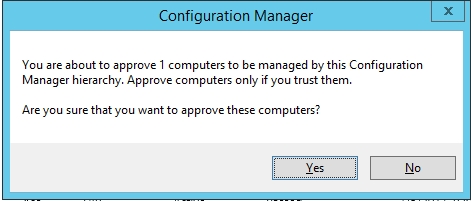
정상적으로 설치되어 인벤토리 정보가 수집되는 개체와의 차이를 보니 바로 'Approved'에 달라짐을 알 수 있었다. Asset and Compliance>Devices 에서 Approved를 별도로 설정하거나 운영한 적이 없었는데 아무래도 SP1으로 업그레이드 되면서 수동 설정으로 된 것 같다. 


♔♔♔♔♔♔♔♔♔♔

[Resolution]

아래 이미지처럼 Not Approved된 개체들을 지정하고 'Approve'하니까 시간이 지나면서 인벤토리는 물론 파일배포까지 모든 게 정상적으로 동작하였다. Thx, God!!!


댓글이나 의견은 언제든지 환영합니다.

Your Comments are Always Welcome!
Share:

Monday, September 4, 2017


[SCCM] Failed to resend previous report as an FSP message (CCMEval)


 Failed to resend previous report as an FSP


[Explanation]
Previous report failed to send as a state message. Attempting to send as an FSP message. CcmEval 8/30/2017 4:56:30 AM 27260 (0x6A7C)
Failed to resend previous report as an FSP message. CcmEval 8/30/2017 4:56:30 AM 27260 (0x6A7C)
Previous send is not complete, need to send report this time. CcmEval 8/30/2017 4:56:30 AM 27260 (0x6A7C)

SCCM Client 평가로그인 ccmeval.log 에서 발생한 메시지로, 확인결과, SCCM SP1으로 업그레이드를 하면서 'Windows Management Framework 3.0'와의 호환성 문제로 발생한 메시지라고 한다. 하지만 아래 링크처럼 SP1에서 발생하지 않는 부분이라고 하는데.. 그렇다면 업그레이드되지 않은 Client 때문일 수도 있을 것 같다. 자세한 해결 방법은 아래 링크를 확인하면 된다. 링크


♔♔♔♔♔♔♔♔♔♔

[Cause]

This issue may occur if Windows Management Framework 3.0 (described in KB 2506143) has been installed in your System Center 2012 Configuration Manager RTM environment. The System Center 2012 Configuration Manager RTM client is incompatible with Windows Management Framework 3.0. During the daily Client Health evaluation, CCMEval.exe mistakenly finds the WMI repository to be corrupted. Therefore, CCMEval.exe requests a rebuild and then reinstalls the client. The rebuild of the repository by CCMEval causes loss of management point-specific information, methods, and more from WMI. This causes the management point to fail.
System Center 2012 Configuration Manager Service Pack 1 (SP1) provides official support for Windows Management Framework 3.0. Therefore, System Center 2012 Configuration Manager SP1 is not affected by this issue.
[Resolution] 
To resolve this issue, apply System Center 2012 Configuration Manager SP1 to your environment. For System Center 2012 Configuration Manager RTM environments, you can work around the issue by setting the following registry value to True on the affected clients:

HKEY_LOCAL_MACHINE\SOFTWARE\Microsoft\CCM\CcmEval\NotifyOnly

When this registry value is set to True, the client still runs the evaluation task daily and then incorrectly reports that the WMI repository is corrupted. However, it does not request the repository rebuild or the daily client reinstallation.

If the management point is already failing because of the evaluation that is being run, you must uninstall and then reinstall the management point to make sure that it is back online. To do this, follow these steps: Reinstall MP role

  • Under Servers and Site System Roles, select the server that is hosting the failing management point. 
  • Right-click the Management Point role, and then select Remove Role.
  • Monitor the MPSetup.log on the Management Point server to make sure that the removal is complete. 
  • Right-click the same server, and then select Add Site System Roles.
  • In the wizard, select the Management Point role, and then monitor the MPSetup.log on the Management Point server to make sure that the reinstallation is complete.


댓글이나 의견은 언제든지 환영합니다.

Your Comments are Always Welcome!
Share:

Sunday, September 3, 2017


[SCCM] "The operating system reported error 53: The network path was not found" Troubleshooting


SMS_Client_Config_Manager 에서 53 이벤트에 대한 조치 사항


[Explanation]

SCCM Console에서 Monitoring > System Status > Component Status > SMS_Client_Config_Manager에서 이벤트를 확인해보니 아래와 같은 메시지가 발생하고 있었다. 

Client Configuration Manager cannot find machine "Client PC hostname" on the network. The operating system reported error 53: The network path was not found. 


해당 메시지는 이벤트에 표시된 Client와 Primary Server 간의 통신이 되지 않을 때 발생하는 메시지로 네트웍을 확인해보거나 DNS 문제일 수 있다고 구글링에서 참고를 하였지만 두가지의 문제로 본다면 다른 Client PC와는 정상적으로 통신되는 상태는 설명되지 않는다.  
그래서 Client로 ping을 해보니, ping이 되지 않았다. 확인 결과, 해당 Client는 이미 미사용하는 Client 정보인데 왜 Primary Server는 이 미사용한 Client와 지속적으로 통신을 하려는 것일까? 바로 (설치경로):\Microsoft Configuration Manager\inboxes\ccrretry.box 에 이전 기록이 남아있기 때문이었다. 
Primary Server는 한번  ccrretry.box에 이력을 남기면 1주일을 주기로 계속 시도를 수행한다. 그렇기 때문에 이부분을 해결하기 위해서는 이미 미사용하는 Client 개체에 대한 garbage 정보를 삭제해줘야 하는데, 이는 Administration에서 설정을 하거나 보다 간단하게 ccrretry.box에 있는 0byte로 된 파일을 지워버리면 된다. 

댓글이나 의견은 언제든지 환영합니다.

Your Comments are Always Welcome!
Share:

Thursday, August 31, 2017


[SCCM] SCCM Inventory 수집 및 비정상 수집 시 조치 사항


SCCM Inventory 수집 및 조치 사항


[Explanation]

Client에서 설치된 SCCM agent가 Primary Server로 Inventory 정보를 송신하는데, 이와 관련해서 필요한 파일 경로를 확인해보자. 
우선 Primary Server에서는 크게 3가지, MP_Status.log, MP_Sinv.log(S/W Inventory 통신) , MP_Hinv.log(H/W Inventory 통신)를 살펴봐야 한다. 아래 이미지를 보면 30분을 주기로 서버랑 통신하는 Client의 file을  확인할 수 있다. 


 Client에서는 아래 로그 파일을 통해서 정상적으로 로그가 수집되어 Primary에 전송이 되어 있는지 확인을 해본다. InventoryAgent.log는 Client PC에서 인벤토리 수집하는 과정을 정리해 놓은 로그파일이고  InventoryProvider.log는 수집된 정보를 Primary Server로 전송하는 과정을 표현한 로그이다. 


 만약 Client에서 전송된 정보가 Primary Server에서 비정상적인 상태로 분류가 된 경우에는 아래 경로 SCCM폴더:\SMS_CCM\Inventory 와 SCCM폴더:\Microsoft Configuration Manager\inboxes\auth\dataldr.box\BADMIFS에서 확인할 수 있으며 비정상적인 상태가 아닌 경우에도 간혹 충돌로 인해 발생할 수 있으므로 BADMIFS 내 세부 분류된 폴더의 정보를 삭제하여 경과를 지켜봐야 한다. 


댓글이나 의견은 언제든지 환영합니다.

Your Comments are Always Welcome!
Share:

Wednesday, August 30, 2017


[SCCM] ccm_system_windowsauth/request failed with 0x87d00231에 대한 Troubleshooting


ccm_request failed with 0x87d00231


[Explanation]

System Center을 운영하다보면 정말 다양한 에러 메시지를 볼 수 있는데 아래와 같은 메시지가 발생하면서 Client PC에 설치된 SCCM Agent이 Console manager에서 inactive로 상태로 오랫동안 유지가 되어 있었다. 
[CCMHTTP] ERROR: URL=http://SCCMServer/ccm_system_windowsauth/request, Port=80, Options=224, Code=0, Text=CCM_E_BAD_HTTP_STATUS_CODE CcmMessaging 8/23/2017 11:34:30 AM 5184 (0x1440)
Raising event:
instance of CCM_CcmHttp_Status
{
ClientID = "GUID:483E565F-E3B2-4E6F-BECE-872059478B63";
DateTime = "20170823023430.474000+000";
HostName = "SCCMServer";
HRESULT = "0x87d0027e";
ProcessID = 5220;
StatusCode = 500;
ThreadID = 5184;
};
CcmMessaging 8/23/2017 11:34:30 AM 5184 (0x1440)
Successfully sent location services HTTP failure message. CcmMessaging 8/23/2017 11:34:30 AM 5184 (0x1440)
Post to http://SCCMServer/ccm_system_windowsauth/request failed with 0x87d00231. CcmMessaging 8/23/2017 11:34:30 AM 5184 (0x1440)

♔♔♔♔♔♔♔♔♔♔

[Resolution]

관련 자료를 조회해본 결과, 'http://SCCMServer/ccm_system_windowsauth/request'로 인해 발생하였는데 일부 해결책에서는 로그상 언급되어 있는 '80 port'가 원인이라고 하였다. 그래서 아래와 같이 SCCM Console에서 사용하는 port를 80 --> 8080으로 변경하였지만 문제는 개선되지 않았다.  


그래서 IE을 통해서 'http://SCCMServer/ccm_system_windowsauth/request' 경로로 접근하려고 하였지만 505 error가 발생하였다. 해당 경로로 접속이 안되는 것은 IIS 문제이므로 IIS에서 Authority 항목을 확인해보니, 'Anonymous Authentication' 항목이 'disabled' 상태였다. 
SCCM Agent가 Client PC에 설치될 때 'Self-signed'를 통해서 자체 인증으로 설치가 되는데 서버에서는 그 인증서에 대한 인증처리 자체가 되지 않기 때문에 Client 정보가 서버로 통신되지 않은 것이 문제였다. 따라서 'Anonymous Authentication' 항목이 'Enabled' 상태로 변경한 후 정상적으로 통신을 하기 시작하였다. 
.


댓글이나 의견은 언제든지 환영합니다.

Your Comments are Always Welcome!
Share:

Tuesday, August 29, 2017


[SCCM] CcmSetup failed with error code 0x87d0029e with Silverlight


SCCM Client agent 실패 원인 '0x87d0029e'


[Explanation]

SCCM Client Agent 설치 오류는 워낙 케이스가 다양하다보니 하나씩 기회가 될 때마다 소개해드리겠습니다. 금번 오류는 error coder가 '0x87d0029e'에 대한 오류입니다.

로그는 우선 살펴보면, Silverlight의 hash값이 달라서 오류가 발생한다고 나와 있습니다. 참고로 파일 hash 값을 확인하는 방법은 2012 R2 서버 또는 이상의 OS에서 파워쉘을 실행하고 나서 "Get-FileHash Silverlight.exe"로 실행하시면 됩니다. 
File 'C:\Windows\ccmsetup\Silverlight.exe' with hash 'AFA7A7081D30B00A4F57C32932BD6D84940BB43B3F5FEB0828FF988C80E2D485' from manifest doesn't match with the file hash 'E3B0C44298FC1C149AFBF4C8996FB92427AE41E4649B934CA495991B7852B855' ccmsetup 2017-07-26 오후 5:50:05 3252 (0x0CB4)
Failed to get client version for sending state messages. Error 0x8004100e ccmsetup 2017-07-26 오후 5:50:05 3252 (0x0CB4)
Params to send '5.0.8239.1001 Deployment Silverlight.exe' ccmsetup 2017-07-26 오후 5:50:05 3252 (0x0CB4)
Sending Fallback Status Point message to 'SCCMSERVER01', STATEID='325'. ccmsetup 2017-07-26 오후 5:50:05 3252 (0x0CB4)
<ClientDeploymentMessage ErrorCode="-2016410978"><Client Baseline="1" Platform="1"/></ClientDeploymentMessage> ccmsetup 2017-07-26 오후 5:50:05 3252 (0x0CB4)
Request failed: 500 Internal Server Error
FSPStateMessage 2017-07-26 오후 5:50:05 3252 (0x0CB4)
Failed to send message to FSP. Error 0x80004005 ccmsetup 2017-07-26 오후 5:50:05 3252 (0x0CB4)
Failed to send status 325. Error (80004005) ccmsetup 2017-07-26 오후 5:50:05 3252 (0x0CB4)
Deleted file C:\Windows\ccmsetup\ccmsetup.xml ccmsetup 2017-07-26 오후 5:50:05 3252 (0x0CB4)
CcmSetup failed with error code 0x87d0029e ccmsetup 2017-07-26 오후 5:50:05 3252 (0x0CB4)


♔♔♔♔♔♔♔♔♔♔

[Cause]

로그 상 원인은 Hash값이 달라서 발생한 부분이었지만 보다 근원적인 원인은 아래와 같이 Client가 agent 설치시 /source가 되는 폴더에 있었습니다. 아래 이미지처럼 x86, x64에 해당하는 설치 폴더에서 일부 파일의 용량이 0KB이었습니다. 이 자체가 오류인거죠. 


♔♔♔♔♔♔♔♔♔♔

[Resolution]

저의 경우에는 설치 CD에(CM version 확인 반드시 필요!!!) 있는 Client 설치 경로의 파일을 그대로 copy and paste 하였습니다. 그 결과 이후에 설치되는 client 들은 정상적으로 설치되었습니다. 


댓글이나 의견은 언제든지 환영합니다.

Your Comments are Always Welcome!
Share:

Monday, August 21, 2017


[SCCM] All logs about SCCM


All logs about SCCM 


[Explanation]

SCCM와 WSUS 관련 로그에 대한 정리를 해둔 블로그에서 퍼온 자료이다. 

Client Log Files
  • CAS - Content Access Service. Maintains the local package cache.
  • Ccmexec.log - Records activities of the client and the SMS Agent Host service.
  • CertificateMaintenance.log - Maintains certificates for Active Directory directory service and management points.
  • ClientIDManagerStartup.log - Creates and maintains the client GUID.
  • ClientLocation.log - Site assignment tasks.
  • ContentTransferManager.log - Schedules the Background Intelligent Transfer Service (BITS) or the Server Message Block (SMB) to download or to access SMS packages.
  • DataTransferService.log - Records all BITS communication for policy or package access.
  • Execmgr.log - Records advertisements that run.
  • FileBITS.log - Records all SMB package access tasks.
  • Fsinvprovider.log (renamed to FileSystemFile.log in all SMS 2003 Service Packs) - Windows Management Instrumentation (WMI) provider for software inventory and file collection.
  • InventoryAgent.log - Creates discovery data records (DDRs) and hardware and software inventory records.
  • LocationServices.log - Finds management points and distribution points.
  • Mifprovider.log - The WMI provider for .MIF files.
  • Mtrmgr.log - Monitors all software metering processes.
  • PolicyAgent.log - Requests policies by using the Data Transfer service.
  • PolicyAgentProvider.log - Records policy changes.
  • PolicyEvaluator.log - Records new policy settings.
  • Remctrl.log - Logs when the remote control component (WUSER32) starts.
  • Scheduler.log - Records schedule tasks for all client operations.
  • Smscliui.log - Records usage of the Systems Management tool in Control Panel.
  • StatusAgent.log - Logs status messages that are created by the client components.
  • SWMTRReportGen.log - Generates a usage data report that is collected by the metering agent. (This data is logged in Mtrmgr.log.)

Server Log Files
  • Ccm.log - Client Configuration Manager tasks.
  • Cidm.log - Records changes to the client settings by the Client Install Data Manager (CIDM).
  • Colleval.log - Logs when collections are created, changed, and deleted by the Collection Evaluator.
  • Compsumm.log - Records Component Status Summarizer tasks.
  • Cscnfsvc.log - Records Courier Sender confirmation service tasks.
  • Dataldr.log - Processes Management Information Format (MIF) files and hardware inventory in the Configuration Manager 2007 database.
  • Ddm.log - Saves DDR information to the Configuration Manager 2007 database by the Discovery Data Manager.
  • Despool.log - Records incoming site-to-site communication transfers.
  • Distmgr.log - Records package creation, compression, delta replication, and information updates.
  • Hman.log - Records site configuration changes, and publishes site information in Active Directory Domain Services.
  • Inboxast.log - Records files that are moved from the management point to the corresponding SMS\INBOXES folder.
  • Inboxmgr.log - Records file maintenance.
  • Invproc.log - Records the processing of delta MIF files for the Dataloader component from client inventory files.
  • Mpcontrol.log - Records the registration of the management point with WINS. Records the availability of the management point every 10 minutes.
  • Mpfdm.log - Management point component that moves client files to the corresponding SMS\INBOXES folder.
  • MPMSI.log - Management point .msi installation log.
  • MPSetup.log - Records the management point installation wrapper process.
  • Ntsvrdis.log - Configuration Manager 2007 server discovery.
  • Offermgr.log - Records advertisement updates.
  • Offersum.log - Records summarization of advertisement status messages.
  • Policypv.log - Records updates to the client policies to reflect changes to client settings or advertisements.
  • Replmgr.log - Records the replication of files between the site server components and the Scheduler component.
  • Rsetup.log - Reporting point setup log.
  • Sched.log - Records site-to-site job and package replication.
  • Sender.log - Records files that are sent to other child and parent sites.
  • Sinvproc.log - Records client software inventory data processing to the site database in Microsoft SQL Server.
  • Sitecomp.log - Records maintenance of the installed site components.
  • Sitectrl.log - Records site setting changes to the Sitectrl.ct0 file.
  • Sitestat.log - Records the monitoring process of all site systems.
  • Smsdbmon.log - Records database changes.
  • Smsexec.log - Records processing of all site server component threads.
  • Smsprov.log - Records WMI provider access to the site database.
  • SMSReportingInstall.log - Records the Reporting Point installation. This component starts the installation tasks and processes configuration changes.
  • SMSSHVSetup.log - Records the success or failure (with failure reason) of installing the System Health Validator point.
  • Srvacct.log - Records the maintenance of accounts when the site uses standard security.
  • Statmgr.log - Writes all status messages to the database.
  • Swmproc.log - Processes metering files and maintains settings.

Admin Console Log Files
  • RepairWizard.log - Records errors, warnings, and information about the process of running the Repair Wizard.
  • ResourceExplorer.log - Records errors, warnings, and information about running the Resource Explorer.
  • SMSAdminUI.log - Records the local Configuration Manager 2007 console tasks when you connect to Configuration Manager 2007 sites.

Management Point Log Files
  • MP_Ddr.log - Records the conversion of XML.ddr records from clients, and copies them to the site server.
  • MP_GetAuth.log - Records the status of the site management points.
  • MP_GetPolicy.log - Records policy information.
  • MP_Hinv.log - Converts XML hardware inventory records from clients and copies the files to the site server.
  • MP_Location.log - Records location manager tasks.
  • MP_Policy.log - Records policy communication.
  • MP_Relay.log - Copies files that are collected from the client.
  • MP_Retry.log - Records the hardware inventory retry processes.
  • MP_Sinv.log - Converts XML hardware inventory records from clients and copies them to the site server.
  • MP_Status.log - Converts XML.svf status message files from clients and copies them to the site server.

Mobile Device Management Log Files
  • DmClientHealth.log - Records the GUIDs of all the mobile device clients that are communicating with the Device Management Point.
  • DmClientRegistration.log - Records registration requests from and responses to the mobile device client in Native mode.
  • DmpDatastore.log - Records all the site database connections and queries made by the Device Management Point.
  • DmpDiscovery.log - Records all the discovery data from the mobile device clients on the Device Management Point.
  • DmpFileCollection.log - Records mobile device file collection data from mobile device clients on the Device Management Point.
  • DmpHardware.log - Records hardware inventory data from mobile device clients on the Device Management Point.
  • DmpIsapi.log - Records mobile device communication data from device clients on the Device Management Point.
  • dmpMSI.log - Records the MSI data for Device Management Point setup.
  • DMPSetup.log - Records the mobile device management setup process.
  • DmpSoftware.log - Records mobile device software distribution data from mobile device clients on the Device Management Point.
  • DmpStatus.log - Records mobile device status messages data from mobile device clients on the Device Management Point.
  • FspIsapi.log - Records Fallback Status Point communication data from mobile device clients and client computers on the Fallback Status Point.

Mobile Device Client Log Files
  • DmCertEnroll.log - Records certificate enrollment data on mobile device clients.
  • DMCertResp.htm (in \temp) - Records HTML response from the certificate server when the mobile device Enroller program requests a client authentication certificate on mobile device clients.
  • DmClientSetup.log - Records client setup data on mobile device clients.
  • DmClientXfer.log - Records client transfer data for Windows Mobile Device Center and ActiveSync deployments.
  • DmCommonInstaller.log - Records client transfer file installation for setting up mobile device client transfer files on client computers.
  • DmInstaller.log - Records whether DMInstaller correctly calls DmClientSetup and whether DmClientSetup exits with success or failure on mobile device clients.
  • DmInvExtension.log - Records Inventory Extension file installation for setting up Inventory Extension files on client computers.
  • DmSvc.log - Records mobile device management service data on mobile device clients.

Operating System Deployment Log Files
  • CCMSetup.log - Provides information about client-based operating system actions.
  • CreateTSMedia.log - Provides information about task sequence media when it is created. This log is generated on the computer running the Configuration Manager 2007 administrator console.
  • DriverCatalog.log - Provides information about device drivers that have been imported into the driver catalog.
  • MP_ClientIDManager.log - Provides information about the Configuration Manager 2007 management point when it responds to Configuration Manager 2007 client ID requests from boot media or PXE. This log is generated on the Configuration Manager 2007 management point.
  • MP_DriverManager.log - Provides information about the Configuration Manager 2007 management point when it responds to a request from the Auto Apply Driver task sequence action. This log is generated on the Configuration Manager 2007 management point.
  • MP_Location.log - Provides information about the Configuration Manager 2007 management point when it responds to request state store or release state store requests from the state migration point. This log is generated on the Configuration Manager 2007 management point.
  • Pxecontrol.log - Provides information about the PXE Control Manager.
  • PXEMsi.log - Provides information about the PXE service point and is generated when the PXE service point site server has been created.
  • PXESetup.log - Provides information about the PXE service point and is generated when the PXE service point site server has been created.
  • Setupact.log Setupapi.log Setuperr.log Provide information about Windows Sysprep and setup logs.
  • SmpIsapi.log - Provides information about the state migration point Configuration Manager 2007 client request responses.
  • Smpmgr.log - Provides information about the results of state migration point health checks and configuration changes.
  • SmpMSI.log - Provides information about the state migration point and is generated when the state migration point site server has been created.
  • Smsprov.log - Provides information about the SMS provider.
  • Smspxe.log - Provides information about the Configuration Manager 2007 PXE service point.
  • SMSSMPSetup.log - Provides information about the state migration point and is generated when the state migration point site server has been created.
  • Smsts.log - General location for all operating system deployment and task sequence log events.
  • TaskSequenceProvider.log - Provides information about task sequences when they are imported, exported, or edited.
  • USMT Log loadstate.log - Provides information about the User State Migration Tool (USMT) regarding the restore of user state data.
  • USMT Log scanstate.log - Provides information about the USMT regarding the capture of user state data.

Network Access Protection Log Files
  • Ccmcca.log - Logs the processing of compliance evaluation based on Configuration Manager NAP policy processing and contains the processing of remediation for each software update required for compliance.
  • CIAgent.log - Tracks the process of remediation and compliance. However, the software updates log file, *Updateshandler.log - provides more informative details on installing the software updates required for compliance.
  • locationservices.log - Used by other Configuration Manager features (for example, information about the client’s assigned site) but also contains information specific to Network Access Protection when the client is in remediation. It records the names of the required remediation servers (management point, software update point, and distribution points that host content required for compliance), which are also sent in the client statement of health.
  • SDMAgent.log - Shared with the Configuration Manager feature desired configuration management and contains the tracking process of remediation and compliance. However, the software updates log file, Updateshandler.log, provides more informative details about installing the software updates required for compliance.
  • SMSSha.log - The main log file for the Configuration Manager Network Access Protection client and contains a merged statement of health information from the two Configuration Manager components: location services (LS) and the configuration compliance agent (CCA). This log file also contains information about the interactions between the Configuration Manager System Health Agent and the operating system NAP agent, and also between the Configuration Manager System Health Agent and both the configuration compliance agent and the location services. It provides information about whether the NAP agent successfully initialized, the statement of health data, and the statement of health response.

System Health Validator Point Log Files
  • Ccmperf.log -Contains information about the initialization of the System Health Validator point performance counters.
  • SmsSHV.log - The main log file for the System Health Validator point; logs the basic operations of the System Health Validator service, such as the initialization progress.
  • SmsSHVADCacheClient.log - Contains information about retrieving Configuration Manager health state references from Active Directory Domain Services.
  • SmsSHVCacheStore.log - Contains information about the cache store used to hold the Configuration Manager NAP health state references retrieved from Active Directory Domain Services, such as reading from the store and purging entries from the local cache store file. The cache store is not configurable.
  • SmsSHVRegistrySettings.log - Records any dynamic changes to the System Health Validator component configuration while the service is running.
  • SmsSHVQuarValidator.log - Records client statement of health information and processing operations. To obtain full information, change the registry key LogLevel from 1 to 0 in the following location:HKLM\SOFTWARE\Microsoft\SMSSHV\Logging\@GLOBAL

Desired Configuration Management Log Files
  • ciagent.log - Provides information about downloading, storing, and accessing assigned configuration baselines.
  • dcmagent.log - Provides high-level information about the evaluation of assigned configuration baselines and desired configuration management processes.
  • discovery.log - Provides detailed information about the Service Modeling Language (SML) processes.
  • sdmagent.log - Provides information about downloading, storing, and accessing configuration item content.
  • sdmdiscagent.log - Provides high-level information about the evaluation process for the objects and settings configured in the referenced configuration items.

Wake On LAN Log Files
  • Wolmgr.log - Contains information about wake-up procedures such as when to wake up advertisements or deployments that are configured for Wake On LAN.
  • WolCmgr.log - Contains information about which clients need to be sent wake-up packets, the number of wake-up packets sent, and the number of wake-up packets retried.

Software Updates Site Server Log Files
  • ciamgr.log - Provides information about the addition, deletion, and modification of software update configuration items.
  • distmgr.log - Provides information about the replication of software update deployment packages.
  • objreplmgr.log - Provides information about the replication of software updates notification files from a parent to child sites.
  • PatchDownloader.log - Provides information about the process for downloading software updates from the update source specified in the software updates metadata to the download destination on the site server.
  • replmgr.log - Provides information about the process for replicating files between sites.
  • smsdbmon.log - Provides information about when software update configuration items are inserted, updated, or deleted from the site server database and creates notification files for software updates components.
  • SUPSetup - Provides information about the software update point installation. When the software update point installation completes, Installation was successful is written to this log file.
  • WCM.log - Provides information about the software update point configuration and connecting to the Windows Server Update Services (WSUS) server for subscribed update categories, classifications, and languages.
  • WSUSCtrl.log - Provides information about the configuration, database connectivity, and health of the WSUS server for the site.
  • wsyncmgr.log -Provides information about the software updates synchronization process.

WSUS Server Log Files
  • Change.log - Provides information about the WSUS server database information that has changed.
  • SoftwareDistribution.log - Provides information about the software updates that are synchronized from the configured update source to the WSUS server database.

Software Updates Client Computer Log Files
  • CAS.log - Provides information about the process of downloading software updates to the local cache and cache management.
  • CIAgent.log - Provides information about processing configuration items, including software updates.
  • LocationServices.log - Provides information about the location of the WSUS server when a scan is initiated on the client.
  • PatchDownloader.log - Provides information about the process for downloading software updates from the update source to the download destination on the site server. This log is only on the client computer configured as the synchronization host for the Inventory Tool for Microsoft Updates.
  • PolicyAgent.log - Provides information about the process for downloading, compiling, and deleting policies on client computers.
  • PolicyEvaluator - Provides information about the process for evaluating policies on client computers, including policies from software updates.
  • RebootCoordinator.log - Provides information about the process for coordinating system restarts on client computers after software update installations.
  • ScanAgent.log - Provides information about the scan requests for software updates, what tool is requested for the scan, the WSUS location, and so on.
  • ScanWrapper - Provides information about the prerequisite checks and the scan process initialization for the Inventory Tool for Microsoft Updates on Systems Management Server (SMS) 2003 clients.
  • SdmAgent.log - Provides information about the process for verifying and decompressing packages that contain configuration item information for software updates.
  • ServiceWindowManager.log - Provides information about the process for evaluating configured maintenance windows.
  • smscliUI.log - Provides information about the Configuration Manager Control Panel user interactions, such as initiating a Software Updates Scan Cycle from the Configuration Manager Properties dialog box, opening the Program Download Monitor, and so on.
  • SmsWusHandler - Provides information about the scan process for the Inventory Tool for Microsoft Updates on SMS 2003 client computers.
  • StateMessage.log - Provides information about when software updates state messages are created and sent to the management point.
  • UpdatesDeployment.log - Provides information about the deployment on the client, including software update activation, evaluation, and enforcement. Verbose logging shows additional information about the interaction with the client user interface.
  • UpdatesHandler.log - Provides information about software update compliance scanning and about the download and installation of software updates on the client.
  • UpdatesStore.log - Provides information about the compliance status for the software updates that were assessed during the compliance scan cycle.
  • WUAHandler.log - Provides information about when the Windows Update Agent on the client searches for software updates.
  • WUSSyncXML.log - Provides information about the Inventory Tool for the Microsoft Updates synchronization process. This log is only on the client computer configured as the synchronization host for the Inventory Tool for Microsoft Updates.

Windows Update Agent Log File
  • WindowsUpdate.log - Provides information about when the Windows Update Agent connects to the WSUS server and retrieves the software updates for compliance assessment and whether there are updates to the agent components


댓글이나 의견은 언제든지 환영합니다.

Your Comments are Always Welcome!
Share: